
E-invoicing software compliant with EN 16931 for ZUGFeRD, UBL, CII, PEPPOL BIS 3.0 Billing, and EDIFACT
Treesoft E-Invoice Toolkit – the E-Invoice Software
With the Treesoft E-Invoice Toolkit, you can effortlessly meet all legal e-invoicing requirements. You can use it to receive, validate, and edit e-invoices—and, if you wish, create them using our integrated Creator (your mini-ERP). With the Treesoft E-Invoice Toolkit, anything is possible.
If your software only generates PDF invoices—no problem! The PDF2E-Rechnung Converter included in the toolkit can even convert traditional PDF invoices into legally compliant e-invoices in no time. It fully supports all common standards, such as ZUGFeRD, UBL, CII, e-invoicing (according to EN 16931), PEPPOL BIS 3.0 Billing, and EDIFACT. You’ve actually found the one-stop solution 😉.

Add e-invoicing functionality to your ERP software
If you’re using a proven ERP software solution and want to add the e-invoicing functionality it lacks, then the Treesoft E-Invoicing Toolkit is exactly what you need.
Customizing your existing ERP system can be expensive, time-consuming, or technically impractical. A complete system overhaul is even more costly. The Treesoft E-Invoice Toolkit offers an alternative: You keep your existing system and simply add the missing e-invoice features.
An Overview of All E-Invoicing Features—Without Changing Your ERP System
- You can simply continue using your existing ERP software.
- No need for a complex implementation of a new, expensive ERP system.
- Local on-premises installation: The toolkit runs directly on your system, and your customer and billing data remain securely stored on your own system.
- Permanently free access: With the built-in Treesoft E-Invoice Viewer, you can receive and save e-invoices for free, with no limits.
- Maximum validation reliability: The Treesoft E-Invoice Validator enables real-time validation against official standards (Schematron/XSLT, XSD). To do this, the toolkit uses the proven libraries from Mustang, drawing on a foundation that has been tested over many years and is highly compliant with standards.
- Includes a PDF printer: The Treesoft PDF Printer is already included in the toolkit.
- Smart PDF Conversion: The Treesoft PDF2E-Rechnung Converter converts your traditional PDF invoices into legally compliant e-invoices in no time. It fully supports all common standards, such as ZUGFeRD, UBL, CII, e-invoicing (per EN 16931), PEPPOL BIS 3.0 Billing, and EDIFACT.
- Automatic PDF/A-3 Upgrade: If your PDF invoice is not yet in the PDF/A-3 format required by ZUGFeRD, the toolkit will convert it automatically and free of charge.
- Flexible Document Management: Incoming and outgoing invoices are filed automatically, and you have complete freedom to configure the folder and file names.
- Audit-proof database: Your invoices are automatically stored in a way that prevents them from being altered, ensuring full GoBD compliance.
- Automatic Invoice Register: The toolkit automatically generates a complete register of incoming and outgoing invoices in the background.
- Audit Export at the Click of a Button: Using the integrated IDEA export feature, you can immediately submit data during a tax audit in the format officially required by the tax office—ensuring legal compliance and adherence to GoBD standards.
The Treesoft E-Invoice Toolkit protects you from unpleasant surprises during a tax audit. Our system exports your outbound invoice ledger exactly in the standardized IDEA format (including the required index.xml file). The tax auditor can import the data directly into the tax authority’s official audit software. Combined with our tamper-proof database archiving, this ensures you are completely compliant with tax law. - Process Automation: Recurring conversion and distribution processes can be easily automated.
This allows you to add all the necessary functions for ZUGFeRD/Factur-X, CII, UBL, e-invoicing (in XRechnung syntax), PEPPOL BIS 3.0 Billing, and EDIFACT—all without having to change your usual invoicing workflows.
💡 Tip: Just click on the individual product logos in the graphic to go directly to the details for each module!
Creating e-invoices with Excel, Word, or other Office programs
Do you create your invoices using Excel, Word, Google Docs, Google Sheets, LibreOffice Writer, or Calc? With the Treesoft E-Invoice Toolkit, you can keep working the way you’re used to.
Create your invoice as usual and export it as a PDF. The Treesoft PDF2E Invoice Converter processes the invoice data based on a configuration tailored to your form and generates the invoice in the desired e-invoice format. The invoice is automatically validated and archived in compliance with GoBD. Our free invoice templates already include the appropriate configuration.
Your invoice template remains the same. The toolkit handles conversion, validation, and archiving.
Why a DATEV upload at a later time alone is not enough
An issued invoice must not be overwritten later without being noticed, and certainly not intentionally. The original content must be preserved, and any corrections must be traceable. This applies regardless of which program you use to create your invoices. Laws on the Internet
Even if your tax advisor uses DATEV: Proper document retention begins right in your company. Uploading documents later does not replace the timely retention of your original documents. However, a monthly exchange of documents is possible if the invoices have been properly saved and organized by that time. DATEV
For incoming e-invoices, the structured invoice data must be preserved intact in its original electronic form. A printout alone is not sufficient for this purpose. Federal Ministry of Finance
The Treesoft E-Invoice Toolkit handles archiving directly as part of the invoicing process. The invoices generated and imported using this tool are automatically stored in the local database in a format that cannot be altered. You can keep track of everything in the incoming and outgoing invoice ledgers.
You continue working as usual. The toolkit generates your e-invoices and archives them automatically—without the need to manually file each invoice separately.
An Overview of All E-Invoicing and Security Features for Office Users
- You can continue to use your existing Office programs (Excel, Word, Google Docs, Google Sheets, Writer, Calc) without any issues.
- No need for a complex implementation of a new, expensive ERP system.
- Local on-premises installation: The toolkit runs directly on your system, and your customer and billing data remain securely stored on your own system.
- Permanently free access: With the built-in Treesoft E-Invoice Viewer, you can receive and save e-invoices for free, with no limits.
- Maximum validation reliability: The Treesoft E-Invoice Validator enables real-time validation against official standards (Schematron/XSLT, XSD). To do this, the toolkit uses the proven libraries from Mustang, drawing on a foundation that has been tested over many years and is highly compliant with standards.
- Includes a PDF printer: The Treesoft PDF Printer is already included in the toolkit.
- Smart PDF Conversion: The Treesoft PDF2E-Rechnung Converter converts your traditional PDF invoices into legally compliant e-invoices in no time. It fully supports all common standards, such as ZUGFeRD, UBL, CII, e-invoicing (according to EN 16931), PEPPOL BIS 3.0 Billing, and EDIFACT.
- Automatic PDF/A-3 Upgrade: If your PDF invoice is not yet in the PDF/A-3 format required by ZUGFeRD, the toolkit will convert it automatically and free of charge.
- Flexible Document Management: Incoming and outgoing invoices are filed automatically, and you have complete freedom to configure the folder and file names.
- Audit-proof database: Your invoices are automatically stored in a way that prevents them from being altered, ensuring they are fully GoBD-compliant—the very moment you send them or receive them.
- Automatic Invoice Register: The toolkit automatically generates a complete register of incoming and outgoing invoices in the background.
- Audit Export at the Click of a Button: Using the integrated IDEA export feature, you can immediately submit data during a tax audit in the format officially required by the tax office—ensuring legal compliance and adherence to GoBD standards.
The Treesoft E-Invoice Toolkit protects you from unpleasant surprises during a tax audit. Our system exports your outbound invoice ledger exactly in the standardized IDEA format (including the required index.xml file). The tax auditor can import the data directly into the tax authority’s official audit software. Combined with our tamper-proof database archiving, this ensures you’re completely safe from a tax law perspective. - Process Automation: Recurring conversion and distribution processes can be easily automated.
This allows you to add all the necessary functions for ZUGFeRD/Factur-X, CII, UBL, e-invoicing (in XRechnung syntax), PEPPOL BIS 3.0 Billing, and EDIFACT—all without having to give up your established invoicing workflows.
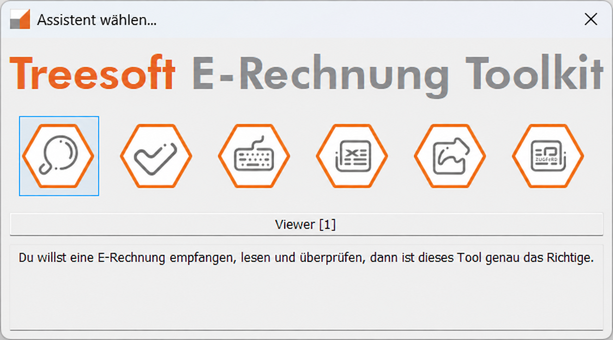
All Tools in the Treesoft E-Invoice Toolkit
Treesoft E-Invoice Viewer
If you want to receive, read, and verify an e-invoice—such as an XRechnung or ZUGFeRD invoice—then this tool is exactly what you need.
Treesoft E-Invoice Validator
If you want to check whether all required fields in an XRechnung are filled in, or whether the content of the PDF version of a ZUGFeRD invoice matches the content of the XRechnung it contains, then this tool is exactly what you need.
Treesoft E-Invoice Editor
If you want to edit an existing XRechnung—for example, to add missing required information—then this tool is exactly what you need.
Treesoft XRechnung Creator
If you want to create an XRechnung manually, this tool is just what you need. We also refer to it as a mini-ERP, and for good reason.
Treesoft PDF2E Invoice Converter
If you want to convert your PDF invoice into an e-invoice (i.e., XRechnung), then this tool is just what you need. Of course, the converter also generates a ZUGFeRD invoice at the same time.
Treesoft ZUGFeRD Creator
If you want to create a ZUGFeRD invoice from an XRechnung and the corresponding PDF invoice, then this tool is exactly what you need.
Why Treesoft?
Software development from Germany since 1986. For 40 years, Treesoft has been developing professional software solutions for businesses. More than 19,000 customers have already chosen Treesoft software.
In the field of CAD, we have decades of experience in processing and generating PDF documents. This technical expertise has also been incorporated into the development of the Treesoft PDF2E-Rechnung Converter.
Our business expertise is rooted in the development of Treesoft ERP and the integration of a wide variety of ERP systems. This allows us to combine technical know-how with a deep understanding of business processes.
We are also consistently advancing the technological development of the Treesoft E-Invoice Toolkit. The core of the software processes invoice data regardless of format and supports CII, UBL, XRechnung, ZUGFeRD/Factur-X, and PEPPOL BIS 3.0 Billing on a common technical foundation.
And if you need assistance, at Treesoft you’ll be speaking with real people instead of dealing with anonymous ticket systems. For us, personal points of contact and practical support are just as much a part of the product as the software itself.
FAQ – Frequently Asked Questions About the Treesoft E-Invoice Toolkit
More Information
Documentation
Questions about the Treesoft E-Invoice Toolkit?
We’re happy to help!
New customers: +49 2266 4763-830 · e-rechnung.sales@treesoft.de
Existing customers: +49 2266 4763-880 · e-rechnung.support@treesoft.de


