
Manage Your Addresses and Contacts Professionally!
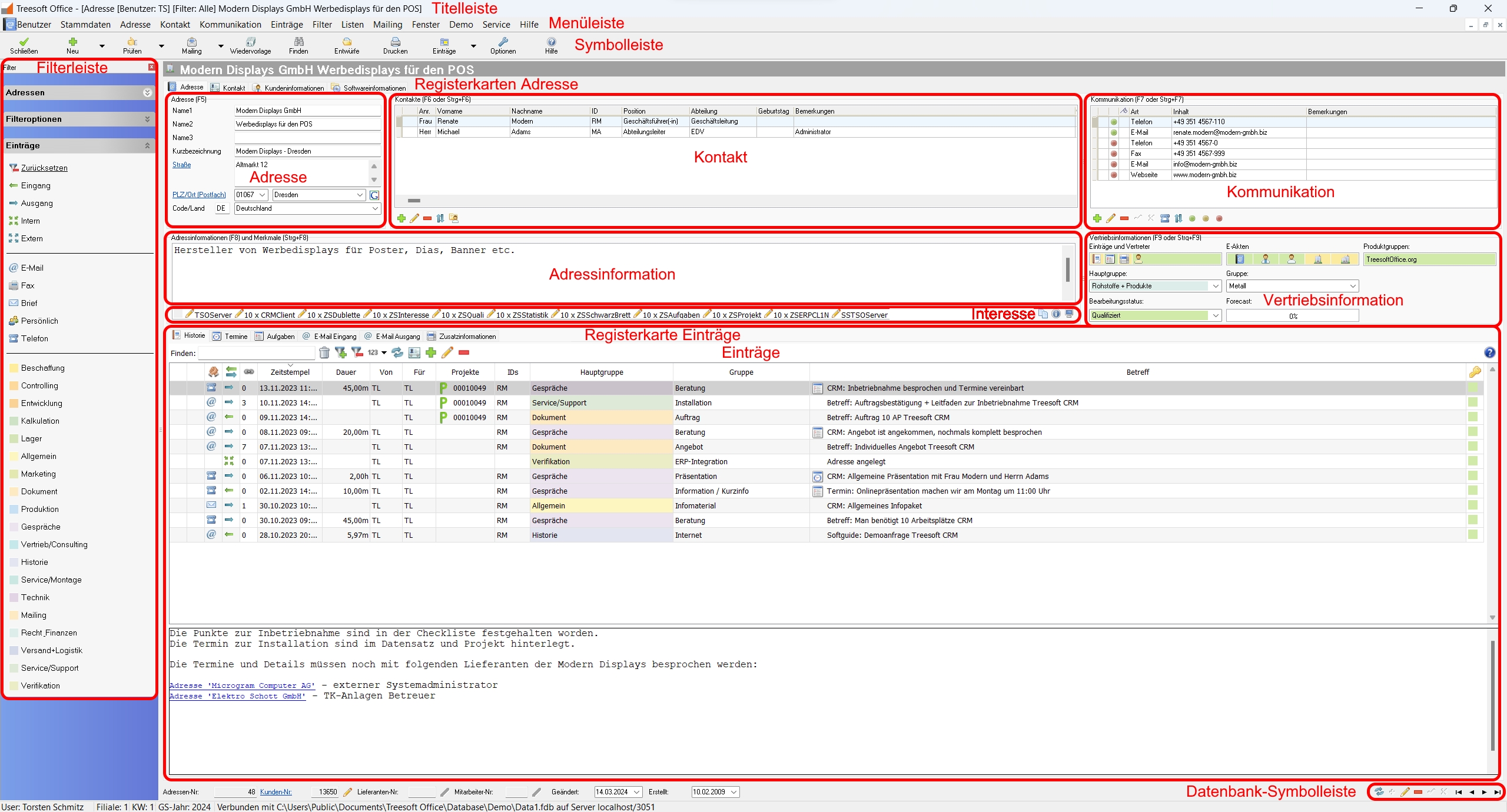
Treesoft Address Management has everything you need. Professional address and contact management for handling your prospects, customers, suppliers, manufacturers, and employees—with as many contacts and communication details as you need—is a breeze. The built-in data entry wizards ensure fast and accurate work. The system flags mismatched entries to ensure data accuracy.
Treesoft’s address management system supports communication via phone, email, fax, and mail. Both personalized letters and predefined standard letters can be created, sent, and logged in the blink of an eye. With the integrated customer history, you always have a clear overview of your customers and can respond immediately—even during a phone call. Long searches are a thing of the past.
Do you have many contacts abroad or frequently deal with large corporations? Then Treesoft Address Management is just right for you. With customizable address layouts, every address is entered exactly as you want it right away, and corporate structures can be mapped using primary and secondary addresses. Standard features—such as assigning responsibilities to processors or representatives, tracking interest in different product groups, and managing multiple customer numbers—are, of course, also included. All data can be filtered at any time using an integrated wizard.
Customer, supplier, manufacturer, and employee information at a glance
Treesoft CRM is an address-based software solution for address management. Using tabs, you can add information about customers, suppliers, manufacturers, and employees. Each address needs to be entered only once, which saves time and makes the whole process even more organized.


Features and Examples of CRM Address Management
Corporate Structures Based on Primary and Secondary Addresses
Thanks to the transparent management of primary and secondary addresses, you can immediately see which store or branch belongs to a company.
Shipping or Billing Addresses
With a single click, you can save as many alternative addresses as you like, such as shipping or billing addresses.
Postal Code and City Directory Database
Treesoft CRM includes a comprehensive list of ZIP codes and cities. As you type, you’ll receive suggestions for ZIP codes or cities. If desired, you can supplement these suggestions as needed. In addition, Treesoft CRM supports country-specific address formats. The format changes automatically based on the selected country code.
Geodata Module
View individual or filtered addresses on the map so you’re always fully informed about your customers’ locations.
Contact Person and Contact Information
In Treesoft CRM, you can enter as many contacts as you like for a given address, as well as communication details (e.g., phone number, email) for those contacts. The contact information is sorted by “Personal,” “Department,” and “Global” and color-coded (red, yellow, green).
Qualifying Communication Data
Decide, based on communication needs, whether to send advertising and/or product information to the contact. This process can also be used to handle responses to promotional campaigns.
Birthday Calendar
For data protection reasons, maintaining a birthday calendar is legally permitted only after obtaining prior consent from the individuals concerned (employees or customers). Use the birthday filter to find out who has a birthday at any given time and send your birthday wishes to the celebrants.
Input Wizards
The built-in input wizards help you enter address information and make data maintenance easier.
Test Filter
Create custom validation filters that include all the required criteria for your addresses. By clicking the “Check” button, you can see whether the selected address was entered correctly or if anything was omitted. This allows you to quickly identify and correct any missing information.
Integrated Full-Text Search
To help you quickly find the address you’re looking for, Treesoft CRM provides you with a powerful, high-performance full-text search in addition to the general search functions (e.g., address, customer number). This search is fully customizable, meaning you can independently specify which database fields the full-text search should include. This allows you to tailor the search to your specific needs.
Data Import / Data Export
Using the import and export wizards in Treesoft CRM, you can easily synchronize address data via vCard, CSV files, and ERP interfaces. Duplicate addresses are automatically detected and excluded during import.
Treesoft CRM Address Management Flyer
Try Treesoft CAD
for free
Questions?
We're happy to help!
+49 2266 4763-800
sales@treesoft.de


