
XRechnung Viewer – On-premises, GoBD-compliant archiving, and free forever
Treesoft XRechnung Viewer
The Treesoft XRechnung Viewer displays XRechnung and ZUGFeRD invoices in a readable format, automatically saves them to the file system upon request, and supports GoBD-compliant organization and archiving of incoming invoices.
The application is installed locally (on-premises), does not require a cloud connection, and can be used free of charge indefinitely.

Simply receiving an e-invoice isn’t enough—it must be processed in a structured manner
A mailbox is enough for receiving mail—but processing, storage, and review require a structured approach.
In practice, simply receiving an XRechnung is usually not enough to ensure orderly processing within a company.
To ensure proper processing, invoices must:
- be filed in a way that is easy to follow
- be available and readable at any time
- can be analyzed in a structured manner
These requirements stem, among other things, from the GoBD (Principles for the Proper Maintenance and Retention of Books, Records, and Documents in Electronic Form, as well as for Data Access).
The Treesoft XRechnung Viewer addresses this very issue and supports the structured organization of all incoming invoices.
Open XRechnung and display it legibly
XInvoices are transmitted as structured XML files in accordance with EN 16931 and cannot be read directly without special software.
The viewer allows you to:
- Open XRechnung
- View ZUGFeRD Invoices
- Display structured XML data in a readable format
- View required fields such as the routing ID
- Review Invoice Line Items Transparent
This enables companies to view, verify, and organize received e-invoices in a structured manner.
BT Favorites – Targeted Review of Relevant Invoice Fields
With the Favorites tab, users can:
- Define selected BT fields
- Monitor critical values in a targeted manner
- Define specific areas of focus for the exam
- speed up the audit process
This results in a real gain in efficiency, particularly for accounting and tax consulting.
Sample View
Use the arrow buttons on the right and left edges of the preview pane to easily scroll through the individual pages of the open XRechnung or ZUGFeRD invoice.
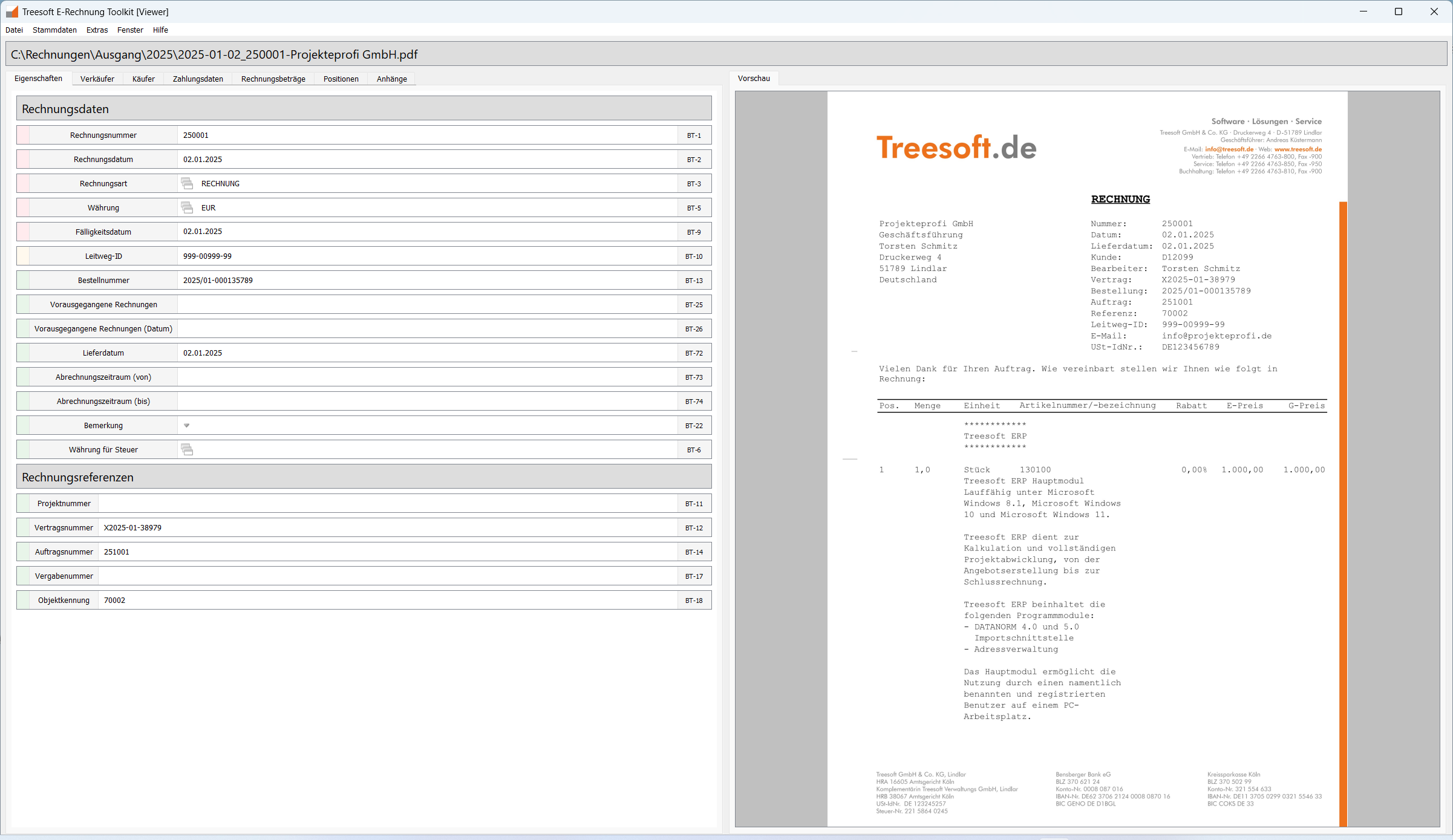
Automatic filing with custom file naming
The viewer can automatically save incoming invoices. In the Options dialog, you can customize the save path and filename pattern:
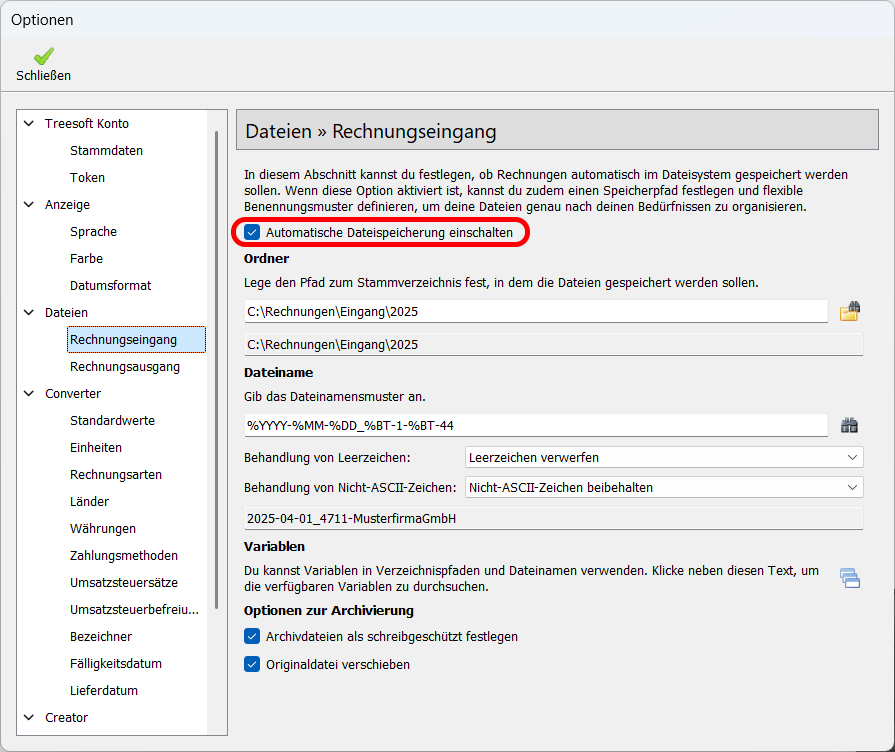
File naming is based on the structured BT (Business Terms) fields of XRechnung.
Standard Template:
%YYYY-%MM-%DD %BT-27 %BT-112 %BT-5
Example:
March 1, 2026 Muster GmbH 14,458.50 EUR
This results in a transparent, consistent, and systematic filing structure.
GoBD-compliant Incoming Invoice Register
All archived invoices are also recorded in the integrated invoice register.
Advantages:
- Comprehensive Documentation
- Structured overview of all incoming invoices
- Support for a GoBD-compliant organization
- Transparency for Tax Advisors and Auditors
The combination of automatic filing, read-only GoBD-compliant archiving, and structured data capture ensures security in the invoice intake process.
Manually Entering Missing Invoice Information
Not every incoming invoice contains all the information needed for automatic file naming.
If certain data is missing from the XRechnung or ZUGFeRD invoice—or if only a PDF invoice is available—the required information can be added directly in the viewer.
In the “Outgoing Invoices” section, for example:
- Invoice Date
- Invoice Number
- Company Name
Enter or correct manually.
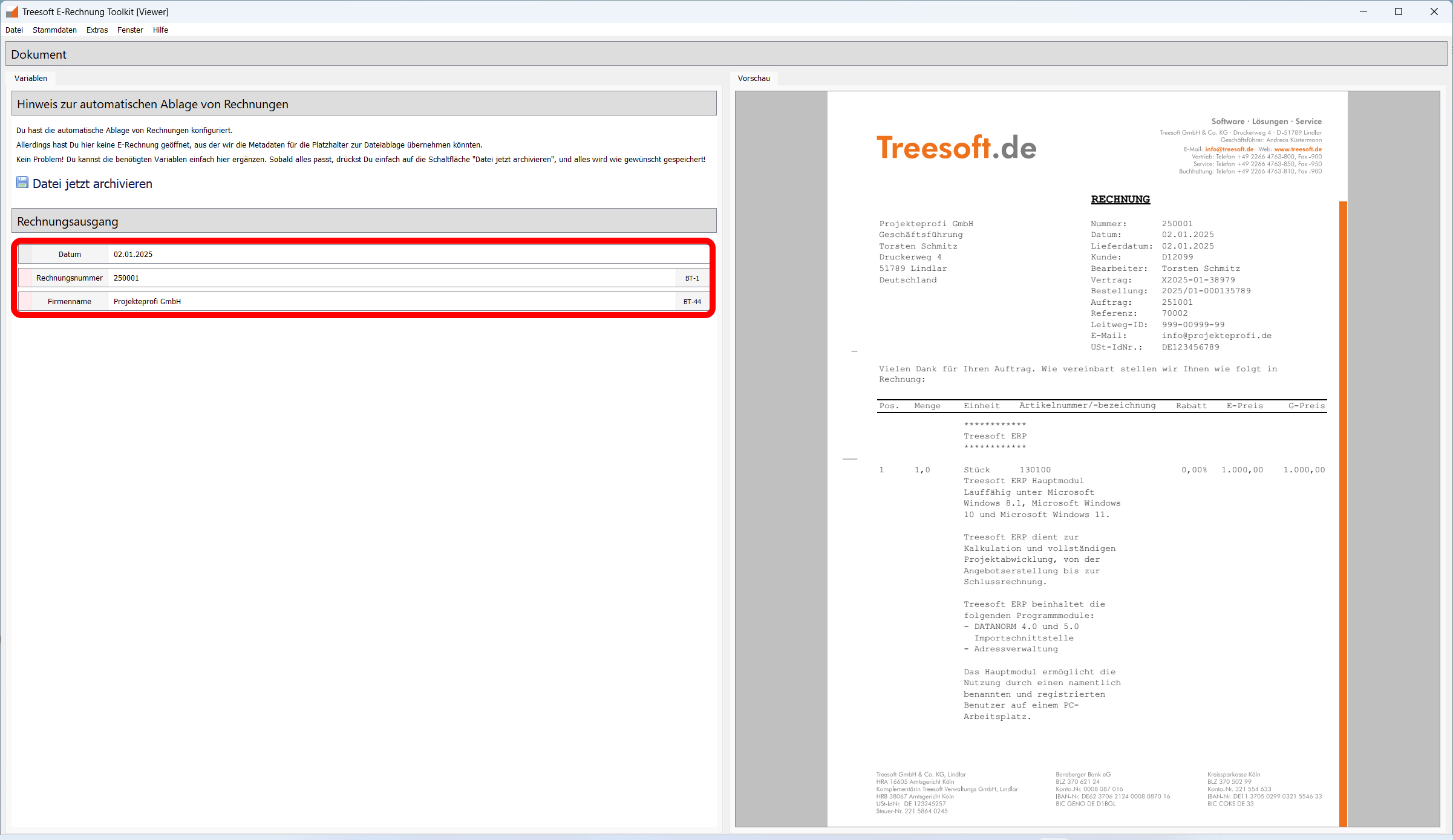
The invoice is then archived with a single click according to the defined filing rules.
This ensures that incoming invoices are organized in a structured, traceable, and GoBD-compliant manner, even when they are incomplete or unstructured.
Benefits at a Glance
- Free Forever
- On-premises – no cloud connection
- GoBD-compliant archiving support
- Automatic File Names from BT Fields
- Custom Directory Structure
- Read-only storage tailored to your specifications
- Integrated Invoice Register
- Can be expanded with additional toolkit modules
- Can be used without registration
Can be used without registration
The Treesoft XRechnung Viewer can be used right away, even without registering or setting up a token account. When you launch the Treesoft E-Invoice Toolkit, we’ll simply ask if you’d like to set up a token account. You can skip this step and start using the viewer immediately.
Why a Token Account Is Still Worth It
A Token account is free and requires no commitment. When you set one up, you’ll enjoy several benefits:
- The prompt that appears when launching the Treesoft E-Invoice Toolkit is no longer displayed.
- Upon request, you can receive a free, no-obligation consultation on e-billing.
- You'll receive an initial token balance, which you can use to try out additional Toolkit modules with no obligation.
- Even if the tokens run out later, the Treesoft XRechnung Viewer will remain free to use indefinitely—even without a prompt at startup.
- You should only order new tokens if you specifically want to.
- We don't have any hidden subscriptions or automatic renewals.
- You'll continue to receive updates and upgrades automatically and free of charge.
Disclaimer
Treesoft GmbH & Co. KG has been developing and selling software for over 40 years. With us, you only buy what you really want—transparently, with no hidden subscriptions and no automatic cost traps.
Who is the viewer intended for?
- Small Business Owners in B2B Inbound
- Small and medium-sized enterprises
- Government Supplier
- Accounting Departments
- Tax Advisor
Anyone who regularly needs to open, review, or archive e-invoices needs a specialized solution.
In a nutshell
The Treesoft XRechnung Viewer is more than just a viewing tool. It combines readability, structured archiving, and organizational security—free forever and without relying on the cloud.
Prices and Token Costs
The Treesoft XRechnung Viewer is free to use indefinitely. The download always includes the complete e-invoice toolkit. When you set up a token account, you’ll receive a free starting balance. This allows you to test all the included tools at your own pace and with no obligation until your starting balance is used up.
FAQ – Frequently Asked Questions about the Treesoft XRechnung Viewer
Additional Modules in the Treesoft E-Invoice Toolkit
The Treesoft XRechnung Viewer is a module in the Treesoft E-Invoice Toolkit. Depending on your needs, you can add additional modules to the workflow:
- XRechnung Validator for validating an XRechnung
- XRechnung Editor for editing and adding missing information
- PDF2XRechnung Converter for converting existing PDF invoices into e-invoices
- XRechnung Creator for manually creating new XRechnungen
- ZUGFeRD Creator for Creating a ZUGFeRD Invoice (XRechnung + PDF Invoice)
This way, the solution grows with your needs—from verifying individual invoices to a complete e-invoicing workflow.
Flyers, price lists, and documentation
Documentation
Treesoft E-Invoice Toolkit User Guide
Order tokens from the online store
Downloading the e-Invoice Toolkit and setting up a token account does not entail any obligation on your part.
Questions about the Treesoft E-Invoice Toolkit?
We’re happy to help!
New customers: +49 2266 4763-830 · e-rechnung.sales@treesoft.de
Existing customers: +49 2266 4763-880 · e-rechnung.support@treesoft.de


