
Convert PDF to E-Invoice – On-Premises
Treesoft PDF2E Invoice Converter
Convert PDFs to e-invoices—locally, automatically, and without switching your invoicing software. With the Treesoft PDF2E-Rechnung Converter, you can generate structured e-invoices from PDF invoices in your ERP system, as well as from Excel, Word, or other Office programs. Processing takes place on your own PC or server: on-premises, without cloud conversion, and without having to re-enter invoice data.
Once the pipeline is set up, the toolkit handles the entire rest of the process: recognizing, converting, and validating PDFs; archiving them in compliance with GoBD; and sending them via email. You create your invoices as usual. The Treesoft E-Invoice Toolkit takes care of the rest.
New in version 2.1: The Treesoft PDF2XRechnung Converter is now called the Treesoft PDF2E-Rechnung Converter. The new name reflects the expanded format support: XRechnung, ZUGFeRD/Factur-X, CII, UBL, PEPPOL BIS Billing 3.0, and EDIFACT. You can find all supported standards in the format overview.

Expand Your ERP to Include E-Invoices—Without Changing Systems
Your ERP system works, maps your business processes, and reliably generates invoices. Is the e-invoicing feature you need missing, limited, or would it require a time-consuming customization? Then enhance your system instead of replacing it.
The Treesoft PDF2E Invoice Converter takes the finished PDF invoice as its starting point. Whether you use standard ERP software, an industry-specific solution, or custom software, you can continue to use your existing invoicing system. A configuration tailored to your invoice template determines how data is extracted from the PDF and converted into the desired e-invoice format.
Mandatory e-invoicing starting in 2027: Prepare for the transition now
The general transition period ends on December 31, 2026, for companies with prior-year revenue exceeding 800,000 EUR. As of January 1, 2027, a simple PDF invoice will generally no longer be sufficient for the affected domestic B2B transactions. The total revenue for the year 2026 is decisive for determining the revenue threshold.
Exceptions—such as those for small-amount invoices—as well as the special EDI transition provisions must still be observed. The details are set forth in Section 27(38) of the German Value-Added Tax Act (UStG) and the FAQs from the Federal Ministry of Finance. Set up your PDF-to-e-invoice process now so that you’re ready by the start of the new year.
Your invoicing process remains the same. The outgoing process becomes automated.
You start your billing run and export the invoices as PDF files to a designated directory. The configured pipeline then processes them without requiring you to re-enter data or manually open each individual invoice.
- Continue using your ERP: No need for a new inventory management system and no duplicate data entry for your invoice information.
- Generate the Correct Format: Convert PDF invoices into the e-invoice format required by the recipient according to set rules.
- Validate automatically: Check the generated invoice against the rules of the selected format before saving it.
- Processing the mailing: Send e-invoices via the configured email workflow, including any required attachments.
- Traceable archiving: Automatically maintain the outgoing invoice ledger, use immutable database storage, and manage additional file storage.
- Processed locally: Your billing data is not transferred to an online converter.
You don’t need a new ERP system. You need the e-invoicing features that are missing. That’s exactly what the Treesoft E-Invoicing Toolkit provides—right down to the fully automated processing of your recurring invoices.
Excel, Word, and other Office programs: Creating e-invoices
Do you create your invoices using Microsoft Excel, Microsoft Word, Google Sheets, Google Docs, LibreOffice Calc, or LibreOffice Writer? Then keep using the programs you’re familiar with. The Treesoft PDF2E Invoice Converter turns your finished PDF invoice into a structured e-invoice—without needing new invoicing software and without having to retype anything.
You create your invoice as usual and export it as a text-based PDF. Treesoft processes the data based on the configuration set up for your template, generates the desired format, and validates the invoice before saving it. It is then automatically recorded in the outgoing invoice ledger and archived in the local database in a read-only format.
The problem isn’t the Office template; it’s the unsaved invoice.
Continuing to work with an invoice template is different from retroactively overwriting invoices that have already been issued. The original invoice content must be preserved; changes must be traceable. A freely editable Office file or a standalone PDF file alone does not guarantee this. The entire retention process is crucial. Among other things, this is based on Section 146(4) of the German Fiscal Code (AO).
A DATEV upload at a later time does not replace the need for you to save the documents yourself
Even if your tax advisor uses DATEV, the proper documentation of receipts begins within your company. Uploading a receipt later does not retroactively make a previously unsaved or overwritten invoice compliant. A monthly exchange of documents is still possible as long as the documents have been properly saved and organized by that time. DATEV also explains this in its GoBD FAQ.
The Treesoft E-Invoice Toolkit handles this archiving directly during processing. You don’t need to transfer the invoices generated by the toolkit to a separate archive one by one afterward.
- Keep using your usual programs and templates: Continue creating invoices in Excel, Word, or other Office applications.
- Issue e-invoices instead of simple PDFs: For example, generate XRechnung or ZUGFeRD without having to re-enter line items, amounts, and addresses.
- Automatic verification and archiving: validation, outgoing invoice ledger, and GoBD-compliant, tamper-proof storage in the toolkit.
- Automate filing and sending: Customize file names, directories, email messages, and attachments to fit your workflow.
- Provide data for the tax audit: Export the outgoing invoice ledger using the integrated IDEA export feature, including the index.xml file.
The appropriate configuration is already in place for the free Treesoft invoice templates for Excel, Word, and LibreOffice. If you’d like to keep your own template, Treesoft will set up the corresponding configuration for you.
Conversion and archiving take place locally. If you use Google Docs, Google Sheets, or another cloud-based office application to create invoices, their own cloud usage remains unaffected.
Deterministic conversion instead of interpreting billing data with AI
With e-invoices, it doesn’t matter whether a match is likely to be correct—it must be correct. That’s why the Treesoft PDF2E-Invoice Converter uses a form-based approach based on fixed rules—rather than AI, which reinterprets invoice details each time it processes them.
Fixed Mapping to the Correct Invoice Fields
The configuration determines which details from your PDF invoice go into which invoice fields. For EN-16931-based formats, these are the Business Terms (BT) fields: for example, invoice number, invoice date, buyer information, line item amounts, and tax information. This mapping forms the basis for output in the various formats.
Deterministic means that identical input data is processed identically as long as the rules remain unchanged. The converter applies the values according to the configured mapping, rather than deriving their meaning based on probabilities.
Extract PDF text directly instead of re-recognizing it via OCR
If an invoice is first read from an image using OCR (optical character recognition), recognition errors can occur as early as this step. The Treesoft PDF2E Invoice Converter, on the other hand, reads the existing text information directly from your PDF. This eliminates the need for a second round of character recognition. Therefore, simple scans or photographed invoices cannot be used as the basis for this conversion process.
Why a plausible AI output does not necessarily prove that a calculation is correct
Generative AI operates on the basis of statistical patterns and probabilities. It can correctly interpret invoice details. However, this does not guarantee that every value has been assigned to the correct field. Such systems require additional checks to ensure that there are no misassignments.
Even if technical validation is passed, this does not prove that every detail matches the original invoice. For example, swapped reference numbers may be formally permissible. Being formally valid and factually correct are not the same thing.
Set it up correctly once—and process recurring invoices automatically
Once the configuration has been set up correctly and verified for your invoice variants, data transfer takes place according to these fixed rules. With correct source data and forms that remain unchanged and appropriate, there is no need for ongoing manual verification of each individual field mapping. This turns the conversion into an automated process rather than an additional verification task.
New form variations, modified layouts, or new business scenarios are taken into account and reviewed in the configuration before they are put into production. The business accuracy of your original invoice remains a prerequisite: A price that is already incorrect there will not become correct through conversion.
Version 2.1: An Overview of E-Invoice Formats and Standards
The new name, Treesoft PDF2E-Rechnung Converter, reflects its expanded range of features. You are not limited to XRechnung; instead, you can convert your PDF invoices into the following formats and standards:
| Format / Standard | Distribution and Use |
|---|---|
| XRechnung in CII | Structured XML invoice using the Cross Industry Invoice syntax. |
| XRechnung in UBL | Structured XML invoice in the Universal Business Language syntax. |
| CII and UBL 2.1 | Structured XML invoices with billing data based on EN 16931. |
| ZUGFeRD / Factur-X | A readable PDF/A-3 file with embedded structured invoice data in CII-XML. |
| PEPPOL BIS Billing 3.0 | UBL-based invoice format; input, output, and validation are implemented in the toolkit. |
| EDIFACT | Structured invoice exchange for agreed-upon EDI procedures and recipient requirements. |
Converting PDF to XML in this context means generating a structured e-invoice, not just any XML file. EN 16931 describes the business data model; CII and UBL are XML syntaxes. XRechnung and PEPPOL BIS Billing specify the requirements in detail. EDIFACT is a standalone EDI syntax. The key factors are always the appropriate invoice profile and your recipient’s specifications.
With ZUGFeRD, the toolkit automatically converts a suitable source PDF to PDF/A-3 as needed, with no additional conversion fee. The structured invoice data is then embedded. A corresponding ZUGFeRD profile is required for a tax-compliant e-invoice; the MINIMUM and BASIC-WL profiles are not sufficient for this purpose.
If desired, you can generate XRechnung in CII, XRechnung in UBL, and ZUGFeRD simultaneously. You do not need to re-enter the outgoing invoice to do so.
Important note regarding Peppol: Format support is not the same as a direct network connection. The toolkit is not currently connected directly to the Peppol network. The generated invoice is currently uploaded manually via your Peppol account.
For EDIFACT, the required message profile and recipient agreement are coordinated during setup. Tax recognition requires, among other things, that the necessary invoice details can be extracted correctly and completely. For more information on acceptable formats, please visit the Federal Ministry of Finance.
Automatically convert, archive, and email PDFs
With a directory monitoring pipeline set up, the converter processes new PDF invoices automatically. As soon as an invoice is available in the specified folder, the configured workflow begins.
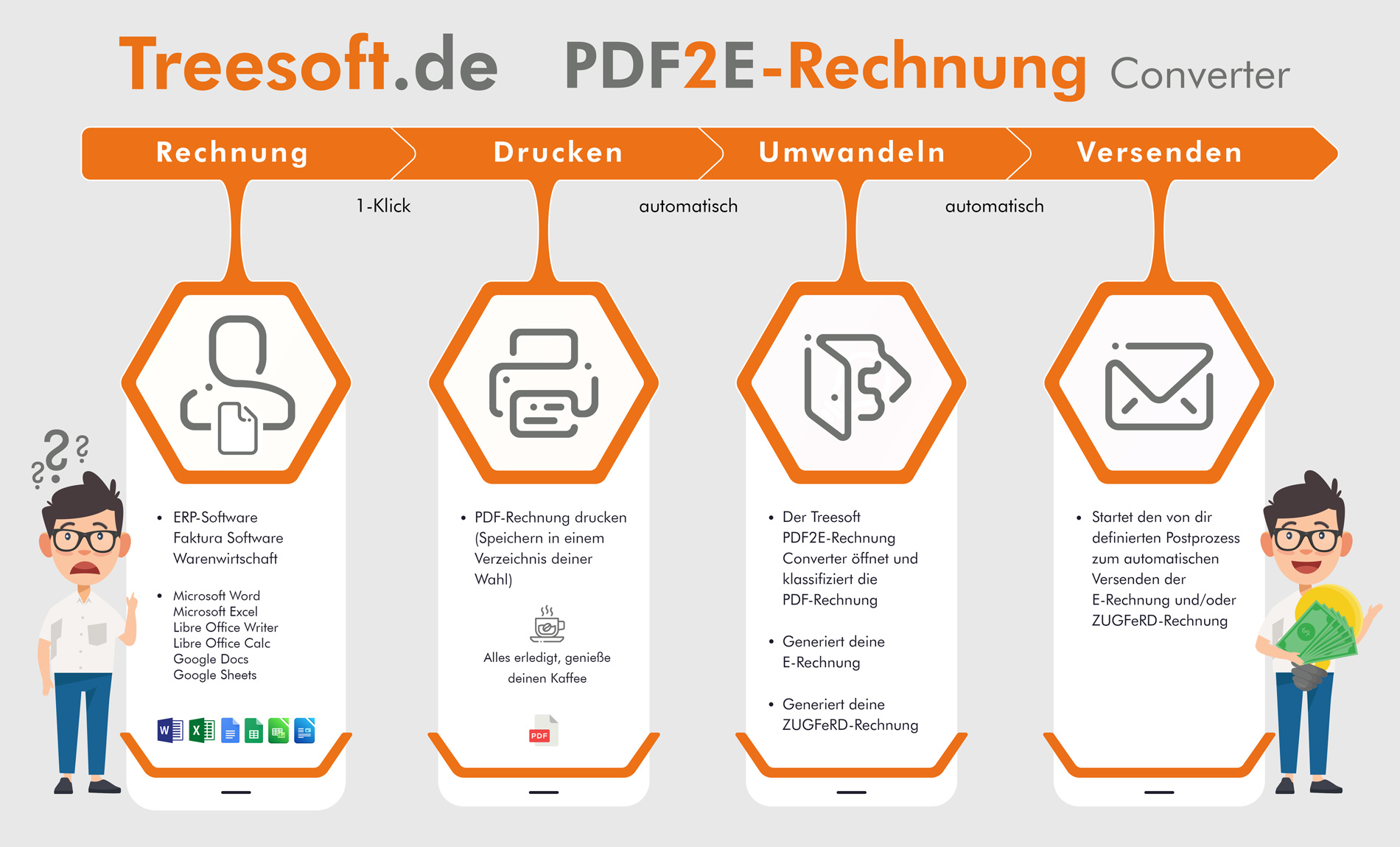
- Export to PDF: Your ERP, Excel, Word, or another Office program saves the completed invoice to the monitored directory. The Treesoft PDF Printer is included in the toolkit.
- Invoice Recognition: The converter recognizes and classifies the document and applies the configuration set up for that purpose.
- Generate an e-invoice: The invoice data is imported according to set rules and output in the desired format.
- Automatic validation: The toolkit checks the generated e-invoice before saving it.
- Saving and Archiving: After successful validation, the file is saved, an entry is made in the outgoing invoice ledger, and the data is stored in the database in a way that cannot be altered.
- Send by email: The configured sending process sends the invoice with the specified text and attachments.
Automatic email processing should be distinguished from the manual upload described above via a Peppol connection.
Your workflow determines the process
You can customize email text, subject lines, file names, storage directories, and additional attachments to suit your company’s needs. For example, you can automatically include copies of documents, measurement lists, or validation reports. For more advanced requirements, the workflow can be extended using a scripting language; Treesoft can program custom workflows for you upon request.
At Treesoft: At least 300 software service invoices per month
Treesoft generates about 300 software service invoices each month. If an employee had to manually check all the imported data and field mappings for each conversion, it would take about five workdays according to our internal estimate—even with experience and a fast work pace.
With our established pipeline, this additional post-conversion check is no longer necessary for the verified invoice variants. The invoice run generates the PDFs; conversion, validation, archiving, and email delivery then take place automatically. In addition to Treesoft, approximately 250 customers are already using this form-based approach.
Setup: Check the PDF and create a configuration
Free preliminary review of your PDF invoice
Send us some typical sample invoices. We’ll check for free to see if the invoice-related content in your PDF can be extracted. Variable information such as line items, amounts, and recipient details must be in text format. Fixed company information—such as that included in letterhead only as an image—can be stored in the configuration.
To set up the system, we need examples from your day-to-day business: single-page and multi-page invoices, various tax scenarios, and, if applicable, credit memos, cancellation invoices, advance invoices, partial invoices, and final invoices. EU and international invoices, as well as industry-specific requirements, should also be included in this discussion.
Treesoft uses this information to create the appropriate configuration for data import, field mapping, and document classification. The one-time setup fee is 299.00 EUR plus VAT. The configuration is already in place for Treesoft invoice templates that are used as-is.
Open individual PDFs or automate the entire process
Once you’ve set everything up, you can decide how you want to work: open and convert individual PDF invoices directly, or process recurring invoices via a pipeline. In both cases, the data import configuration serves as the foundation.
Validate automatically before saving
The toolkit validates the generated invoice before it is saved. If errors are displayed, you can cancel the process, correct the information, and check it again. No tokens are deducted if validation fails. The transaction is charged only after successful validation and saving.
Validation checks for compliance with format specifications and predefined business rules. It does not replace the business accuracy of the source invoice or the careful setup of data mapping.
Archive data in compliance with GoBD and export it for tax audits
A completed e-invoice requires more than just a file name. The Treesoft PDF2E-Rechnung Converter integrates the conversion process with the outgoing invoice ledger and GoBD-compliant archiving in the Treesoft E-Rechnung Toolkit. The generated invoices are automatically saved in an unalterable format in the local database. Additionally, files are stored according to your specifications.
The structured invoice data is retained
For e-invoices, at least the structured portion must be retained intact in its original form. A printout or a view generated solely from it does not replace this data. Therefore, the original electronic invoice must be included in the retention process—not just its legible representation. See the Federal Ministry of Finance’s guidelines on record retention for more information.
IDEA export, including index.xml
For the tax audit, the toolkit provides an IDEA-compatible export of the outgoing invoice ledger, including the required index.xml file. This ensures that the auditors receive not just a standalone CSV file, but the data along with the corresponding structural description for import into the audit software.
The export includes the invoice data stored in the toolkit. It does not replace your company’s other accounting records. Proper use also requires appropriate access rights, data backups, and documentation of your actual workflow.
Free Invoice Templates for Excel, Word, and LibreOffice
Want to get started without setting up custom forms? Use the free Treesoft invoice templates for Microsoft Excel, Microsoft Word, LibreOffice Calc, and LibreOffice Writer. The corresponding configuration for the Treesoft PDF2E Invoice Converter has already been created. This eliminates the setup costs for creating your own invoice template.
Whether you want to modify the form or continue using your existing layout, we’ll tailor the configuration accordingly. The fact that the template is free does not mean that all conversion processes are free: Processing is subject to the toolkit’s token model.
Video: PDF2E Invoice Converter – Explained Quickly and Concisely
The following videos show the converter still under its previous name, PDF2XRechnung Converter. Since version 2.1, the product has been called PDF2E-Rechnung Converter; you can find the expanded list of supported formats at the top of this page.
Video: PDF2E Invoice Converter – Features in Detail
Prices and Token Costs
The preliminary review of your PDF invoice is free of charge. The one-time setup of a custom configuration costs 299.00 EUR plus VAT. If you use the Treesoft invoice templates provided for this purpose, this custom form setup is not required.
Depending on the edition you choose—FREE, BASIS, PLUS, or PRO—and your token package, the cost of conversion, including validation and ZUGFeRD generation, ranges from 0.56 EUR to 4.00 EUR per transaction, plus VAT in each case.
Calculate annual costs based on your billing volume
To determine the total cost, we take into account the edition you’ve chosen, your workstations, your billing volume, and the required workflows. Use the price list and calculation guide, or provide us with this information in the form. Together, we’ll determine the right combination and your estimated annual costs. We’ll coordinate any custom workflow adjustments with you in advance.
Convert PDF to e-invoice now
Keep using your ERP, Excel, Word, or other Office applications. With the Treesoft PDF2E Invoice Converter, you can add the missing features for XRechnung, ZUGFeRD, and other e-invoice formats—locally on your system and, if desired, with a fully automated email sending process.
Download the Treesoft E-Invoice Toolkit and have your PDF invoice checked for readability for free. We’ll work with you to determine the right configuration and the process—from the finished PDF to the archived and sent e-invoice.
FAQ – Frequently Asked Questions About the Treesoft PDF2E Invoice Converter
Additional Modules in the Treesoft E-Invoice Toolkit
The PDF2E Invoice Converter is part of the Treesoft E-Invoice Toolkit. The following modules are available for other tasks:
- Treesoft E-Invoice Viewer for opening and reading electronic invoices; free forever.
- Treesoft E-Invoice Validator for validating structured invoices against the applicable format and business rules.
- Treesoft E-Invoice Editor for adding and correcting invoice details.
- Treesoft E-Invoice Creator for manually creating new e-invoices—your mini-ERP in the toolkit.
- Treesoft ZUGFeRD Creator for merging a valid PDF invoice with the corresponding XML invoice data.
A workspace for your invoicing process: View, review, edit, create, convert, and archive e-invoices—with the Treesoft E-Invoice Toolkit.
Flyers, price lists, and documentation
Documentation
Treesoft E-Invoice Toolkit User Guide
Order tokens from the online store
Downloading the e-Invoice Toolkit and setting up a token account does not entail any obligation on your part.
Questions about the Treesoft E-Invoice Toolkit?
We’re happy to help!
New customers: +49 2266 4763-830 · e-rechnung.sales@treesoft.de
Existing customers: +49 2266 4763-880 · e-rechnung.support@treesoft.de


