
XRechnung Validator: Verify e-invoices, identify risks, and process them accurately
Treesoft XRechnung Validator
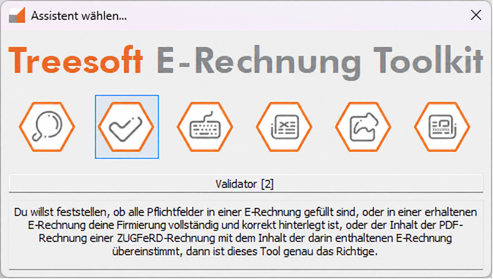
The Treesoft XRechnung Validator is more than just a technical XML validator. You can use it to validate an XRechnung, check for ZUGFeRD compliance, and not only perform a formal check on e-invoices before further processing, but also seamlessly integrate them into your invoicing process.
Traditional XRechnung validators primarily check whether the XML structure, required fields, Schematron rules, and business rules comply with EN 16931 and XRechnung. That is exactly what they are designed to do (GitHub). In everyday business operations, however, this is often not enough, because it’s not just about having a valid file—it’s about secure verification, traceable decisions, and proper archiving.
This is exactly where Treesoft comes in. The Validator also displays invoices in a readable format, helps you match IBAN and account information with supplier master data, checks invoice numbers against the incoming and outgoing invoice ledgers, and helps you organize incoming and outgoing invoices in a structured way. This turns a technical validation process into a productive workflow.
Of course, the Treesoft XRechnung Validator also checks the standard criteria: required information, formatting errors, compliance with EN 16931, and—for ZUGFeRD—the consistency between the PDF invoice and the embedded XML invoice.
More than just a free XRechnung validator
A free XRechnung validator is helpful if you simply want to know whether an invoice is technically valid. For many companies, however, the task doesn’t end with the XML schema and set of rules. An invoice must be read, checked, validated, filed, and retrieved later.
The Treesoft XRechnung Validator is therefore designed for the actual invoicing process. It supports not only formal validation but also business-specific validation in day-to-day operations. Your employees see the invoice in a readable format rather than in plain XML. Bank account information can be reconciled with existing supplier master data. If a supplier has not yet been created, the details can be imported after manual verification and saved for future invoices.
Treesoft also goes a step further when it comes to invoice numbers. In the incoming invoices module, the system checks against the incoming invoice ledger based on the supplier and invoice number. In the outgoing invoices module, the system performs a comparison with the outgoing invoice ledger. Any discrepancies can be intentionally confirmed and documented, rather than disappearing unnoticed in the process.
Combined with automatic file storage, read-only archiving, and the invoice ledger, this creates not just an isolated validation tool, but a solution that allows you to verify e-invoices, process them in a traceable manner, and document them accurately. Automatic file storage and archiving can be configured separately for incoming and outgoing invoices. Together with the invoice ledger, this forms the foundation for GoBD-compliant file management and archiving.
Checking XRechnung – A Look at Required Fields and EN 16931
If you want to validate an XRechnung, you need a clear validation result instead of cryptic XML messages. The Treesoft XRechnung Validator clearly shows you whether required fields are present, whether there are any formatting errors, and whether an XRechnung complies with EN 16931.
The review covers, among other things, required fields in the XRechnung, formal anomalies in the invoice structure, the completeness of relevant information, and compliance with EN 16931. The result is a clear list of errors that allows you to quickly identify discrepancies and take targeted corrective action or ask for clarification.
Validate a ZUGFeRD invoice and compare the PDF with the XML
If you want to validate a ZUGFeRD invoice or check a ZUGFeRD file, the Treesoft XRechnung Validator goes one crucial step further: It not only checks the embedded XML invoice but also verifies that the content of the PDF invoice matches the content of the XRechnung.
This is particularly important for incoming invoices, because while the PDF file is often viewed in day-to-day operations, it is the structured invoice that is processed legally and technically. Discrepancies between the PDF and XML should therefore be identified as early as possible.
ZUGFeRD is particularly strong in:
- Validate ZUGFeRD
- Check the ZUGFeRD Invoice
- Compare PDF and XML Content
- Identify errors quickly and have them corrected in a targeted manner
Validate E-Invoices – Legible and Traceable
An XRechnung is an XML data record and, by its very nature, is not suitable for visual inspection. That is precisely why a purely technical validator is often insufficient for day-to-day operations.
The Treesoft XRechnung Validator therefore supports the verification process right where employees actually work: with a clear, readable display of the invoice, quick visual checks of amounts, line items, and payment details, and a processing workflow that seamlessly integrates with the actual accounting and invoice verification processes.
Vendor Master Data, IBAN Reconciliation, and Secure Verification
A purely technical validator cannot determine whether a formally correct bank account number actually belongs to the known supplier. This is exactly where Treesoft comes in.
The Treesoft XRechnung Validator compares IBAN and account information with the details stored in your supplier master data. If a supplier has not yet been created, the data can be imported after a manual review and saved for future invoices. The comparison then runs automatically for subsequent invoices.
In addition, newly saved supplier data can be confirmed immediately or later using the dual-control principle. This allows you to distinguish between provisionally entered and finally confirmed master data, further enhancing security in your invoice processing.
Incoming Invoices Ledger and Outgoing Invoices Ledger Instead of Just a Collection of Files
The Treesoft XRechnung Validator is part of a larger process within the Treesoft E-Invoice Toolkit. There, incoming and outgoing invoices are not simply stored somewhere, but are systematically recorded in an invoice ledger.
The manual explicitly describes an incoming invoice register for archived incoming invoices and an outgoing invoice register for outgoing invoices created using the toolkit. This ensures that the incoming and outgoing sides are not only technically separated but also documented and traceable at a later date.
This is especially valuable when it comes to outgoing invoices—particularly when invoices need to be corrected, reissued, or annotated. Instead of manually sorting files into folders, you work with a documented structure.
Automatic file storage and read-only archiving according to your specifications
Automatic file storage is one of the key differences compared to simple validators or online-only tools. In the Treesoft E-Invoice Toolkit, you can enable and customize automatic file storage and archiving separately for incoming and outgoing invoices.
In addition, the archive file can be saved as read-only. This is a basic requirement for GoBD-compliant storage and archiving.
In practice, the process involves not just “validating” the e-invoice, but also checking it, filing it in a structured manner, documenting it in a traceable way, and being able to retrieve it quickly later on.
Locally on your PC instead of a cloud workflow
The Treesoft XRechnung Validator is part of the Treesoft E-Rechnung Toolkit and is installed locally as a desktop application. Processing takes place exclusively on your own PC—without transferring customer, supplier, or invoice data to third parties. This on-premises approach applies to the entire toolkit, including the PDF2XRechnung Converter.
This is particularly interesting for companies that want to keep sensitive invoice data in-house, do not want a cloud connection, and wish to continue using their existing software. The Treesoft E-Invoice Toolkit complements ERP systems that cannot process e-invoices at all, can do so only to a limited extent, or can do so only with expensive add-on modules. The same applies to custom software, where developing full e-invoice functionality would simply be too expensive.
The toolkit is particularly valuable for companies that continue to create or prepare invoices using Excel, Word, or LibreOffice. In these cases in particular, GoBD-compliant storage, traceable filing, and proper archiving are essential.
This is ideal for companies that:
- Want to process e-invoices locally
- Do not want a cloud connection
- want to keep sensitive billing data in-house
- would like to effectively supplement their existing ERP or custom software
- You must create invoices using Excel, Word, or LibreOffice and save them in a GoBD-compliant format
Why Companies Choose the Treesoft E-Invoice Validator
- Because they want to verify X-Rechnung and validate ZUGFeRD without having to rely on online tools.
- Because they need more than just an XML validation. Because they want to display invoices in a readable format and verify them more quickly from a business perspective.
- Because they want to integrate supplier master data, IBAN validation, and duplicate checks into the process.
- Because they need to neatly file and document incoming and outgoing invoices. And because they're looking for a local solution that doesn't use the cloud.
The Key Benefits of the Treesoft XRechnung Validator
- Validate XRechnung, ZUGFeRD, and e-invoices for compliance
- Automatically check required fields, formatting errors, and compliance with EN 16931
- Validate ZUGFeRD, including PDF/XML comparison
- Display invoices in a readable format as well
- Match IBAN and account information with supplier master data
- Verify invoice numbers against the incoming invoice ledger and outgoing invoice ledger
- Automatically file and archive incoming and outgoing invoices in read-only format
- Work locally on your own PC instead of in a browser
- Receive at least 500 tokens for testing
- Validation costs range from 0.32 EUR to 3.00 EUR, depending on the version and token package
Who can’t do without the Treesoft XRechnung Validator?
The Treesoft XRechnung Validator is a must-have for companies that receive or send XRechnungen or ZUGFeRD invoices and want to ensure that these are formally correct, technically valid, and reliably verifiable in day-to-day operations.
The Validator is particularly valuable for companies that:
- want to review incoming e-invoices before they are processed further, posted, or archived
- want to automatically verify incoming ZUGFeRD invoices, particularly to ensure consistency between the PDF invoice and the embedded XML invoice
- You want to verify the IBAN, account number, and other payment details against the information stored in the supplier master data in order to detect tampering, changes to bank account information, and the risk of erroneous transfers at an early stage
- want to validate outgoing XRechnungen or ZUGFeRD invoices before sending them, so that incorrect e-invoices are not sent to customers or public contracting authorities in the first place
- Use ERP systems or custom software that generate e-invoices, but which are not always reliably error-free
- Prepare invoices using Excel, Word, or LibreOffice and need a secure and traceable e-invoicing process for sending, verifying, and filing them
Users who generate invoices with the Treesoft PDF2XRechnung Converter also benefit from the fact that these invoices are validated automatically and free of charge. In this way, Treesoft ensures that invoices generated with the converter are only forwarded if they are technically valid.
Get started now: Download and set up a token account
Download the E-Invoice Toolkit now and start using the Treesoft XRechnung Viewer right away to receive e-invoices, with automated file storage according to your specifications—free of charge and with no limits. For validating, editing, creating, and converting, tokens are charged according to the price list.
Here’s how to get started with receiving and viewing e-invoices for free, along with a professional verification and processing workflow, as soon as you need more than just a viewer.
We recommend that you set up a token account using the setup wizard. You’ll then automatically receive a starting balance for the toolkit. You don’t have to buy anything, but you’ll get at least 500 tokens for free!
Prices and Token Costs
Depending on the version you choose—FREE, BASIS, PLUS, or PRO—and the token package you select, a validation costs between 0.32 EUR and 3.00 EUR.
FAQ – Frequently Asked Questions About the Treesoft XRechnung Validator
Additional Modules in the Treesoft E-Invoice Toolkit
The Treesoft XRechnung Validator is a module in the Treesoft E-Invoice Toolkit. Depending on your needs, you can add additional modules to the workflow:
- XRechnung Viewer for opening, reading, and structured archiving
- XRechnung Editor for editing and adding missing information
- XRechnung Creator for manually creating new XRechnungen
- PDF2XRechnung Converter for converting existing PDF invoices into e-invoices
- ZUGFeRD Creator for Creating a ZUGFeRD Invoice (XRechnung + PDF Invoice)
This way, the solution grows with your needs—from verifying individual invoices to a complete e-invoicing workflow.
Flyers, price lists, and documentation
Documentation
Treesoft E-Invoice Toolkit User Guide
Order tokens from the online store
Downloading the e-Invoice Toolkit and setting up a token account does not entail any obligation on your part.
Questions about the Treesoft E-Invoice Toolkit?
We’re happy to help!
New customers: +49 2266 4763-830 · e-rechnung.sales@treesoft.de
Existing customers: +49 2266 4763-880 · e-rechnung.support@treesoft.de


